
Updated on 3 Nov 2026
In the past, knowing how to code and design were essential for creating a website. This meant businesses either had to outsource, spend time and money on training, or create a plain website that realistically didn’t best represent their brand. Or even worse, not have a website at all. But that’s not the case anymore.
The world of AI is changing how we work every day – something we’re sure you hear constantly. And these developments have meant that something like building a site can happen in less than 5 minutes, which is where AI App & Site Builder steps in.
Whether your current website is dull as dishwater, or simply doesn’t exist, you can now build, design and create a custom site without having to write a single line of code.
How does it work?
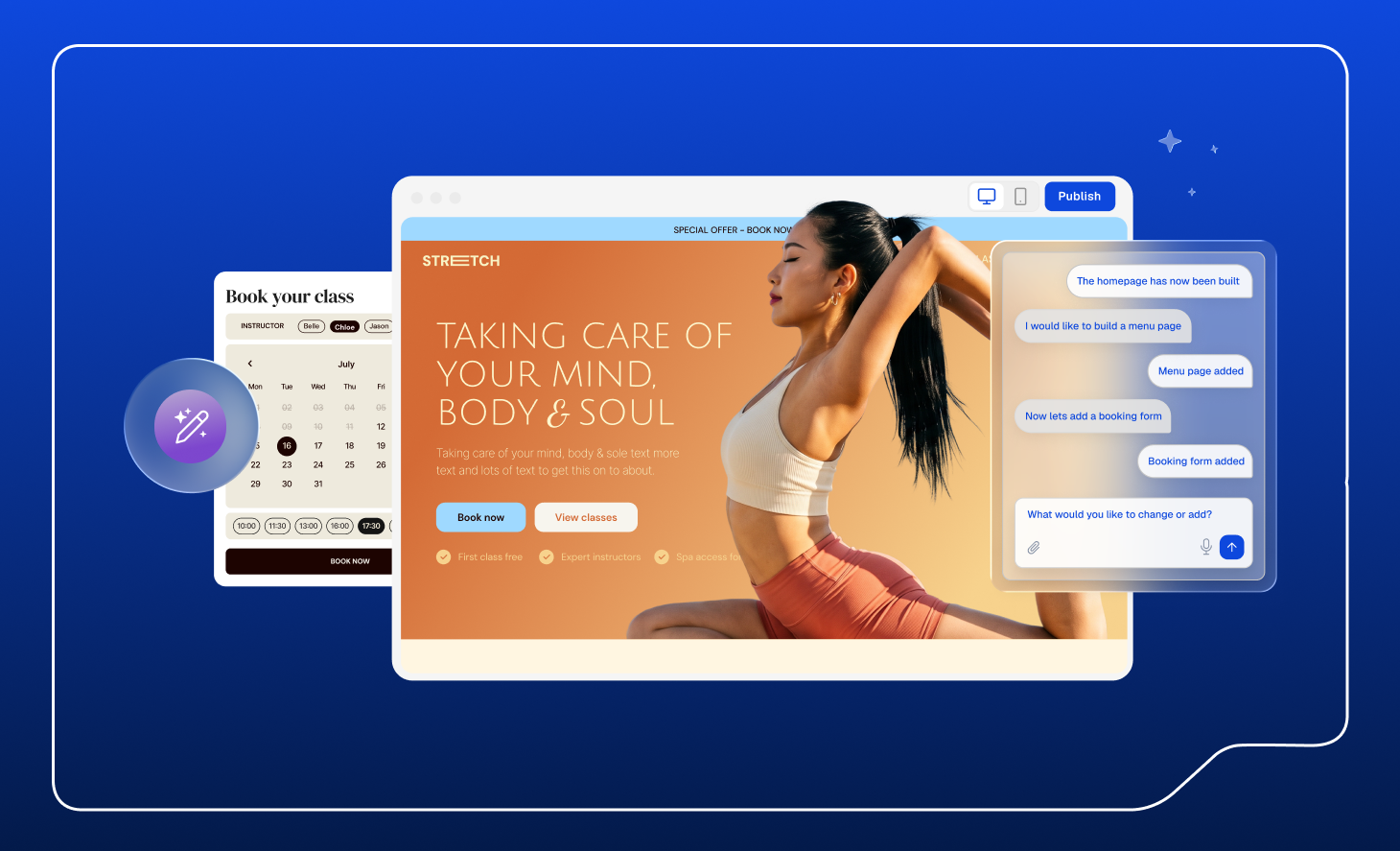
If you haven’t heard of vibe coding before now, it’s a term you should probably get used to. It’s the new way to build websites and it’s taking over the internet. In simple terms, vibe coding is when you describe what you want to build in plain English and the AI builds it for you.
AI App & Site Builder is a vibe coding tool that can be used to build websites (obviously), web apps, internal business tools, client portals, MVPs and more. Pretty much anything you can imagine, it can create. You can have your website, tool or app ready to publish in under 10 minutes.
Each plan comes with a set number of AI credits. So every time you ask the AI to build something new or make a change, it uses credits – though the amount varies depending on what you're asking for and how much work it takes to complete. A simple text update will use far fewer credits than building a complex multi-page web app with custom functionality, for example.
Here’s a quick step-by-step guide from first prompt to go live:
- Choose your package – pick between the Lite, Plus, or Max packages depending on your project needs.
- Describe what kind of website, tool, or web app you want. Be as descriptive as you like, or keep it minimal and let the AI do the work.
- Hit ‘Create’ and watch the AI build from scratch.
- Once it’s finished building, test out the finished product. Click around to make sure everything works how you’d like it to. You can view the site as if it was live, including in mobile view. If you have any questions about why the AI has made a particular decision, you can click on the specific section and ask.
- Make as many edits as you like. You can either do this yourself by clicking on the relevant part and editing text or code (for code edits, hit the icon in the top left corner), or you can tell the AI what you want to change and it’ll implement it for you.
- Once you’re completely happy with the result, hit publish. You can also connect a custom domain, or use the one given to you with your package. The app, site, or tool you’ve built will be live instantly for your customers, team, or clients to use.
There’s minimal effort needed on your part, and it doesn’t take hours or even days to get something fully functional live and ready to explore. It’s the perfect solution for business owners who just don’t have the time or capacity to sit down and learn how to code, design and build the tools they need. That being said, here’s exactly what we think AI App & Site Builder would be best suited for.
One thing worth clarifying before we continue – when we say 'app', we mean web apps – tools and applications that run in a browser, not native mobile apps you'd download from the App Store or Google Play. Think booking systems, dashboards, client portals and internal tools – all built for the web and accessible on any device.
What’s it for?
Whether you’ve just started a business, have a big team you need to manage, or are a founder with a thousand things on your plate, this product is made for you.
Business websites
Starting with the obvious one – if you’ve got a business without a website, your current website is lacking a personality, or you just don’t have time to keep it up to date, AI App & Site Builder can help. Describe your brand, style, what you do, and services/products you offer and get a unique website in under 5 minutes.
You might have a clear vision of what you want it to look like, with brand colours and fonts already picked out. Or maybe you want to start with a blank canvas and give the AI free reign to suggest what it thinks your brand should be. The AI can automatically source and place relevant images on your site, or you can upload your own.
Once you see your website in action, play around with it, clicking through the different pages and reading the suggested content. All content can be edited either by yourself, or by prompting the AI with what you’d like changed.
And when you’re ready to go live, hit publish with either your own custom domain or the one pre-chosen for you. Just like that, your website is ready for the world to see.
Custom web apps
Think about the kind of tools that would usually need a developer. This can all be built using AI App & Site Builder, which is perfect for teams who don’t have a developer, or any coding experience. From invoice trackers to team dashboards, it can all be built to your requirements.
As with creating a site, give the AI the information it needs and hit create.
Here’s just a few of the other things you could build:
- Booking systems, e.g. for salons, restaurants, gyms
- Quote request tool, e.g. for plumbers, electricians, builders
- Rental availability checker, e.g. for holiday homes
- Staff rota or shift management tool
- Client onboarding portal with document upload
- New starter induction hub with resources and checklists
The list goes on of the things you could build.
Landing page
For a new product launch, a single landing page could be ideal for capturing leads, announcing upcoming events, or creating a contact form.
The use cases for AI App and Site Builder overlap in content type, as you can see from the previous ones mentioned. So for example, you could build a landing page with a contact form or waitlist email capture, and also information about your product or service.
The great thing about this is that if you are doing a launch, you can design, build and publish your landing page on the same day that your product goes live, without lengthy review processes or time spent designing and redesigning sections or graphics.
Some more landing page uses could be:
- Event registration for a workshop, webinar, or networking event
- Free resource download page with email capture
- Consultation booking page for service businesses
- Portfolio landing page for a specific niche or service
- Job listing page
Upgrade your current site
If you've already got a site but it's not quite doing the job – whether it looks outdated, doesn't reflect your brand properly, or you've just outgrown it – you don't have to start from scratch.
Give AI App & Site Builder your existing URL and it'll analyse what you've already got and build you an improved version. Same business, better website. You can keep what's working, get rid of what isn't, and end up with something that actually represents where your business is now.
And if you've already got a domain you're happy with, you can transfer it to Fasthosts for free and attach it straight to your new site. No need to change your web address or update all your marketing materials. Everything stays the same, it just points somewhere better.
What’s included?
Every plan includes the things you need to go live without hunting down extra tools or services:
- A free domain for your first year
- SSL certificate included as standard
- Professional business email
- Automatic deployment – no hosting setup needed
- Secure, reliable hosting in Europe
- 24/7 expert support
Ready to build?
If you’re ready to tick ‘website build’ off your to-do list, pick your package and get started today from just £16/month.
And if you need any help or advice, our team is on hand 24/7 to help you. Give us a call on 0333 0142 700 or message via live chat.