Automation is becoming a key part of how modern businesses operate. Whether it’s refining marketing workflows or boosting customer support, companies are increasingly using automation tools to reduce repetitive work and improve business efficiency.
What is automation for business?
Automation is the use of technology to perform business tasks and functions with reduced, little, or no need for human assistance. Many industries encounter repetitive tasks that take up valuable human resources, and can be easily automated to save time and improve efficiency.
Automation has existed for many years in industries such as manufacturing, automotive, and engineering, but has recently become more lucrative to online businesses too.
Some examples of online business automation include:
- Sending confirmation emails after a purchase
- Scheduling social media posts
- Routing customer support requests to the right department
- Updating CRM systems with new customer leads
Traditional automation vs AI-powered automation
While traditional automation has been available to businesses of all sizes for many years now, there’s one type of automation that has promised to change modern processes in 2026 and beyond – AI-Automation.
AI-powered automation is the process of automating business tasks using Artificial Intelligence (AI). By using enterprise-level AI-powered workflows, organisations have access to new ways of developing more efficient processes and meeting their business goals.
While both traditional automation and AI automation aim to reduce manual work, both approaches function in different ways.
In practice, many businesses combine both approaches. Where traditional automation handles structured, rule-based workflows, AI-powered systems provide analysis, interpretation, and decision-making.
When working together, these technologies allow organisations to build more advanced automation systems that reduce repetitive work while still adapting to real-world scenarios.
Searches for traditional automation vs AI-powered automation
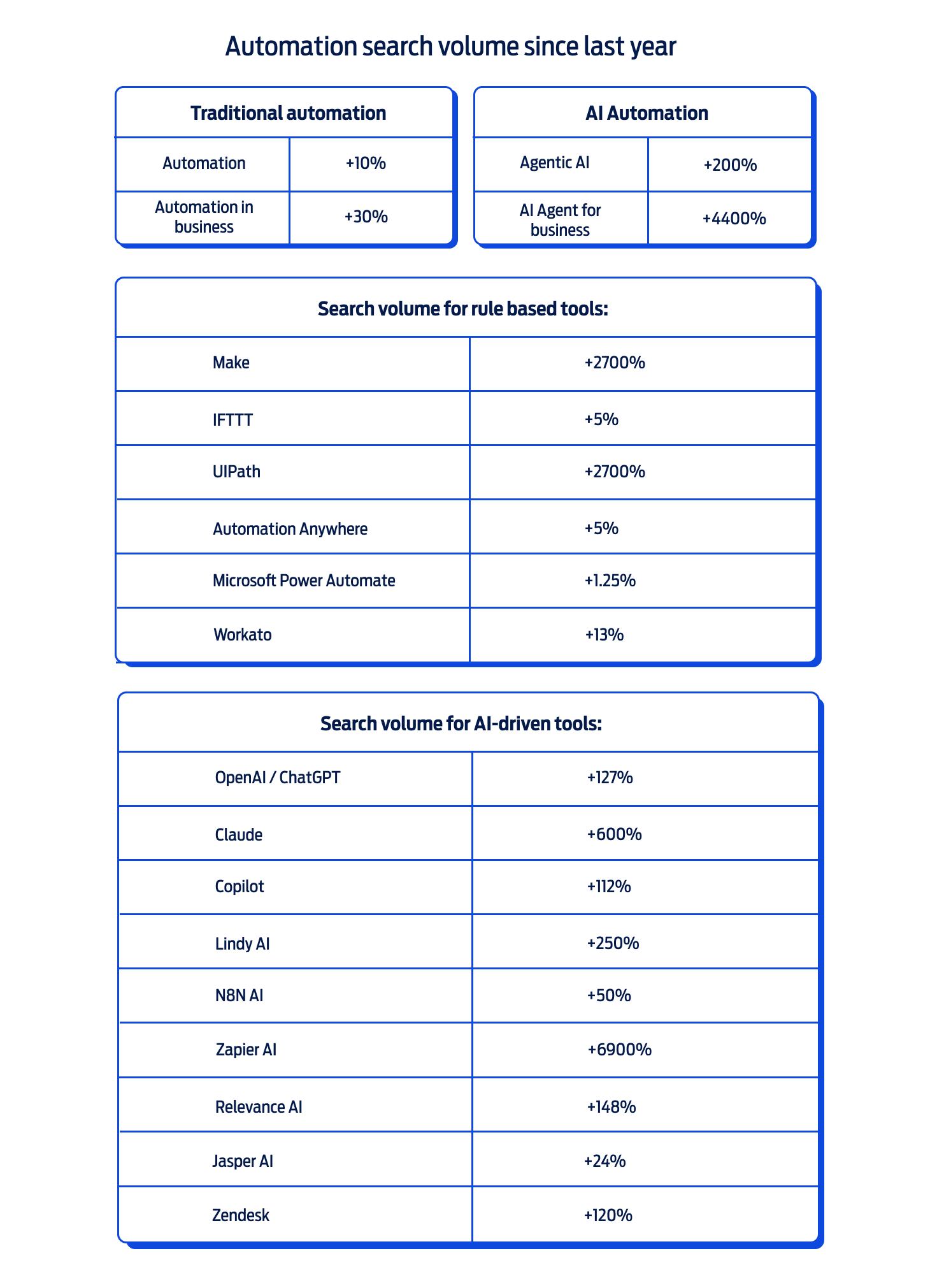
Source: Google Trends
How AI automation can reduce SaaS costs for SMEs
Many SMEs use anywhere between 10 to 20 SaaS tools across marketing, sales, and operations, making software one of the fastest-growing operational costs in business.
AI-powered automation allows organisations to reduce and consolidate workflows by combining tasks that would normally require several tools to work together. For example, an AI workflow can analyse leads, draft personalised follow-ups, update CRM records, and schedule content automatically, all under the same tool.
By reducing reliance on multiple subscriptions, SMEs can streamline operations, save time, and lower their software costs while still maintaining, and potentially even increasing, business efficiency.
FAQs
Q1: How can I set up an AI agent?
Setting up an AI agent usually involves connecting an AI model with a workflow automation platform and the tools you want it to interact with. Many businesses use platforms such as n8n, Zapier, or Make to build workflows that can trigger actions automatically. These platforms can connect to AI models from companies like OpenAI or Anthropic, allowing the agent to analyse data, generate responses, and perform tasks across different applications.
Q2: What hosting requirements do I need for automation or AI agents?
Automation systems and AI agents typically require an environment where scripts, integrations, and workflows can run continuously. This also usually requires reliable processing power, sufficient RAM for background tasks, and stable internet connectivity. Many businesses run these systems on a Virtual Private Server (VPS) so that workflows can operate 24/7 without depending on a personal or business computer being turned on.
Q3: What types of tasks can businesses automate?
Businesses most commonly automate tasks that are seen as repetitive, time-consuming, or rule-based. Some examples of those include sending emails, updating CRM and database records, scheduling social media posts, or generating reports. AI-powered automation tools can also assist with tasks such as summarising documents, drafting messages, or categorising customer queries so plenty can be optimised!
Q4: Do I need coding skills to use automation tools?
Not necessarily. Many automation platforms offer low-code or no-code interfaces that allow users to build workflows using visual builders and templates. While some coding and technical knowledge can help with advanced integrations or custom scripts, many small businesses can implement automation processes without the need for prior programming experience.
Q5: What’s the difference between automation and AI agents?
Traditional automation follows predefined rules and workflows to complete tasks automatically. AI agents, on the other hand, can analyse information, make decisions, and take multiple steps to achieve a goal. While automation executes fixed instructions, AI agents act as traditional employees can, and adapt their actions based on new inputs or data.
Q6: Can small businesses benefit from automation and AI agents?
Yes. Automation tools are becoming increasingly accessible to small and medium-sized businesses because many platforms offer affordable pricing and simple integrations. Even small automation workflows can help teams save time and improve business efficiency.
Q7: Can AI automation replace SaaS tools?
AI automation doesn’t always replace SaaS tools entirely, but it can sometimes reduce the number of separate platforms needed. By connecting SaaS tools and applications and automating workflows, businesses can streamline tasks that might otherwise require multiple standalone tools.
Q7: Is automation secure for business data?
Most modern automation platforms include security features, such as encrypted data transfers, authentication controls, and permission settings. Businesses can also limit the systems an automation workflow or AI agent can access to ensure that personal and sensitive information remains protected.