If you’ve got a WordPress site, you need to be working on SEO. There’s no better way to attract visitors and quality leads to your website – all for free. After all, what’s the point in building a beautiful website if nobody’s ever going to see it?
Here’s just a few things you should know before diving into the world of SEO on WordPress:
- SEO is the process of improving your site to make it more likely to appear in search engines.
- SEO is a great marketing channel to invest in due to its potential to deliver free leads and visitors.
- Start your WordPress site’s SEO off on the right foot by ensuring the basics are covered – like schema markup, XML sitemaps, site structure, and page speed.
- Give Google a reason to rank you. When you create content, always try to make it better than what’s already on the web.
- To really accelerate your WordPress SEO growth, invest in off-site SEO strategies like link building and digital PR to boost your site’s authority.
Now that we’ve got that covered, let’s go into a bit more detail...
What is SEO?
SEO (or Search Engine Optimisation) is the process of optimising your website to improve its rankings in search engines like Google. Higher rankings means more traffic, and potential leads or customers for your business. SEO requires continuous effort and refinement to ensure your site is ranking and performing at its best. When done right, it’s an incredible channel for delivering quality leads for little-to-no cost.
Here’s a few examples of the kind of things you can do to improve SEO:
- Creating high-quality content based on keyword research
- Optimising your site speed to improve load times and user experience
- Launching PR campaigns to win links from sites in your industry
Why invest in SEO for your WordPress website?
Investing in and improving SEO isn’t just important for WordPress sites, it’s worthwhile for every site on the internet. Optimising your WordPress site for SEO will increase your reach and visibility for your target market, bring in more visitors, and increase sales.
What’s more, none of this requires additional budget like paid channels, making it incredibly cost-effective. Creating optimised SEO content for your WordPress site will also improve your site’s authority and credibility, as you’re offering broader insights into your products and services that go above and beyond.
WordPress SEO basics
When starting out on your WordPress SEO journey, there’s a few things you need to keep in mind. Effective SEO is about far more than just sprinkling keywords into your content. To get you started on the right foot, be sure to do the following:
1. Check your site's visibility settings
The first step to improving your WordPress site’s organic visibility is to make sure Google can actually find it. Under “Settings” in your WordPress dashboard there is a “Privacy” section. Make sure your site is set to Public once it’s ready for the world to see.
2. Use an SEO-friendly permalink structure
By default, WordPress uses a plain numerical URL structure, which might look something like “example.com/blog/12345” – great for bots, but not for humans. The simplest way to create SEO and user-friendly URL structures is to go Settings > Permalinks and select the “Post Name” option. This will use the title of your post as the URL slug, instead of the default string of numbers. Or, if you’re more confident, you can create custom URLs for each post. Either way, the important thing is to make sure your URLs are concise and relevant to the post topic.
3. www. vs non-www.
The www. and non-www. versions of your site are technically considered to be two different websites by search engines, so it’s important to choose one. There’s no advantage to choosing one or the other, but it’s vital to pick one and stick to it. Under Settings > General, you’ll find WordPress Address (URL) and Site Address (URL) fields. Make sure that your preferred URL is the same in both.
4. Choosing the best WordPress SEO plugin
There are over 60,000 plugins available on WordPress, all to help you with different areas of your site. From ecommerce and design to galleries and, of course, SEO – the possibilities for plugins are endless.
One of the top plugins is All in One SEO (AIOSEO). It’s the original WordPress SEO plugin used by over 3 million sites. It’s easy to use, and handles all sorts of technical elements, like breadcrumb navigation, schema markup, and more.
. Adding an XML sitemap in WordPress
XML sitemaps are crucial to SEO success because they give Google an easy to crawl list of URLs to help your pages get found and added to their index. If you’re using All in One SEO, it will create an XML sitemap for you under the URL /sitemap.xml. All you’ll need to do is submit it to Google, described in the next step.
6. Adding your site to Google Search Console
Search Console is one of the most versatile and powerful tools in anyone’s arsenal for improving SEO. Adding your site to Google search console is a great idea, as it’ll let you gather insights on the keywords visitors use to find you, which pages receive the most clicks, advise you of technical issues, and so much more.
To submit your sitemap to Google, simply select “Sitemaps” in the Search Console menu, enter your URL, and click submit.
7. Categories and Tags
Helping search engines understand your website’s structure, content, and hierarchy is a vital part of improving organic visibility. WordPress categories and tags allow you to do just that.
8. Adding schema markup and rich snippets
Schema markup (now called structured data) refers to a special set of HTML code which gives search engines more data about your website and pages. This can include the type of content (blog, news article, recipe), price, reviews, and so much more. Adding schema data also makes users more likely to click on your links in the SERPs, as they will contain more useful info and take up more space.
9. Optimise comments
Allowing comments on your site shows how engaged users are with your content. However, it’s important to make sure you moderate them to prevent spam. You don’t want your positive, engaging content to be drowned out by ads or inappropriate comments, as this can hurt your site’s trustworthiness and may even harm SEO. There are numerous plugins available which allow you to stop comment spam and only allow genuine comments to be posted – like Antispam Bee, Disable Comments and Anti-Spam: Spam Protection.
10. Full posts vs summaries or excerpts
WordPress displays your latest posts in a number of places, including the homepage, category pages, author pages and more. By default, it shows the full article content on these pages. This is no good, as the full content will make these pages load more slowly, and won’t be as user-friendly as tightly-written summaries.
To change this, go to Settings > Reading and under For each post in a feed, include: select Excerpt.
Choosing the best WordPress theme for SEO
Picking the right theme can be one of the most important decisions you’ll make for your WordPress site. When it comes to SEO, you not only want a site that reflects your business/project, but you’ll also want a lightweight theme that loads as quickly as possible. You can also use a tool like Page Speed Insights to take the demo site URL from the theme’s official website, put it into PSI, and take a look at the results. You’ll want a theme that scores 90 or higher.
Here’s a few examples and what kind of business or project they could be suitable for:
Safar
Light, spacious and professional, Safar is primarily made for tour and travel agencies, but can easily be repurposed for brands or products that rely on visual presentation as a means of attracting consumers.
Feelin’ Good
Bring on the late 80’s vaporwave nostalgia, Feelin’Good boasts an aesthetic that’s hard to look away from. It’s best for fashion retailers and ecommerce stores.
One Pageily
Elegant and minimalist, One Pageily is a free, multi-purpose landing page theme you should seriously consider for your summer promotions. This theme can be used for startups, agencies and corporate portfolios.
For more on choosing the right WordPress theme, check out this blog post.
On-site SEO for WordPress
Now that you’ve got the basics down, it’s time to talk about some more SEO-specific tactics...
1. Keyword research
The core of any SEO strategy is good keyword research. This will tell you what keywords your potential readers/customers search most often, uncover related keywords, and even questions your customers ask around your products or services. There are so many great tools out there for this, but one of the best tools is Google’s own (free!) Keyword Planner.
If you’re not sure where to start, make a list of all your business’ USPs (unique selling points). You can then turn this list into keywords, which can form the basis of your SEO strategy. You could also take a look at competitor sites to understand what sort of keywords they’re going after, and how the keywords fit into a hierarchy. Which brings us to...
2. Site architecture
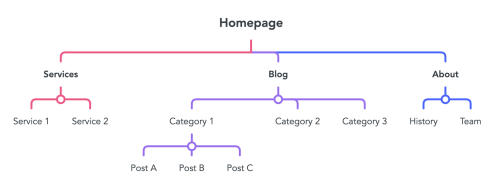
If you want to maximise your SEO success, you’ll want to set your site out in a logical hierarchy. This will help users and search engines understand your content and the relationship between your pages. Group related pages together in a way that makes sense. For example:
Recipes > Soups > Tomato Soup
Safari > Animals > Giraffes
Gardening > Flowers > Roses
The way your site is laid out is vitally important for not only the customer journey, but also for SEO purposes. Make sure your site flows in a logical way, using your keywords to organise your sections. This includes subheadings, titles and paragraphs – but more on this later.

3. Navigation
The navigation or main menu of a site is one of the most crucial parts, as it’s the most common way users move around your site. It’s also a very strong SEO signal, as URLs linked in your main navigation are featured on every page of your site, showing high importance. Your navigation should be simple, logical, and easy to use. You don’t want visitors to have to hunt for what they’re looking for.
4. Breadcrumb navigation
Implementing Breadcrumb navigation is another way to help users and search engines understand your site structure. Breadcrumbs are a text path displaying the current page’s position in the site hierarchy, allowing users to quickly navigate backwards should they need to.
5. Crafting great content
You need to give search engines a reason to rank your content above what’s already covering the same topic on the web. If you don’t offer anything unique or better than the competition, why should Google put you ahead of them?
Whenever you create content for your WordPress site, take the time to make it the best it can be. As well as keyword research, look into the pages that are already ranking highly for your target keywords. This will help you understand what sort of content Google is already rewarding, and give you a benchmark to surpass.
You can improve upon existing competitor content in numerous ways. This could mean offering a greater breadth or depth of information thanks to extensive research, unique insights from your experience and expertise, or a better user experience through the use of multimedia like imagery and videos.
6. Use of headers
Just as you lay your site out in a logical hierarchy, your content should be structured in the same way. This will improve readability for visitors, and make it easier for Google to parse and understand. Headers are a great way to break content up, organise it into logical sections, and make key bits of content stand out.
For example, if you’re writing a DIY how-to guide, you’ll want to start with a list of tools and materials, then the step-by-step guide, and finish off with common questions. Each of these sections will feature headings and subheadings, all aiding in the flow of the content, and offering an opportunity to include keywords.
7. Internal linking
Internal links are links that go between pages on the same site. The correct use of internal links will allow you to further demonstrate the relationship between your pages, and offer a way to guide users down a journey – whether to further information, or directing them to a relevant product page at the right time. In doing this, you’re getting visitors to travel around your site and look at everything you have to offer.
Key internal linking tips:
- Match user expectations – the content and context of an internal link should let users know what to expect. If they're sent somewhere they didn't anticipate, they may bounce back or leave your site entirely.
- Use keywords – using keywords in your internal links is a great way to send additional signals to search engines. Just make sure that you're not using the same limited set of keywords every time you link to the same page.
8. Meta titles
Your page's title tag is an important SEO ranking factor, and one of the biggest elements in determining whether or not users click on your site. A good meta title will start with the target keyword, offers additional benefits and firs with the standard meta title pixel width (580px).
Here are some tips for creating your own title tags:
- Make every title tag unique
- Lead with your target keyword
- Don't just stuff keywords in
- Use pipes | or commas , to separate keywords/sections
- Include your brand name if possible
- Include a call-to-action if possible
- Make sure your title tags are max 580px wide
9. Meta descriptions
Although meta descriptions aren't a ranking factor like meta titles, they still offer a unique chance to present more information to users in the SERPs and entice them to click.
Here are some tips for creating meta descriptions:
- Lead with a verb
- Include target keywords naturally
- Add product/service USPs
- Max 145 characters
- Finish with a call-to-action
10. Alt text
Alt text is a crucial part of web accessibility, as it’s used by screen readers to describe images. For SEO purposes, try to include keywords where possible, but your focus should be a concise, accurate description of the image.
Let’s take a look at some examples.
Bad alt text is stuffed with keywords, doesn’t exist or is too vague, like:
“dog, Labrador, ball, park, field, dog playing fetch.”
Good alt text should be descriptive and useful to the site visitor. Include a keyword if it’s natural, but don’t overuse them. A good example of alt text could be:
“A chocolate Labrador chases a ball through Hyde Park on a bright, summer day.”
Off-site SEO for WordPress
As well as what you do on your site, there are plenty of other factors to consider off your site.
1. Link building
Links act as votes of confidence on the web. Earning links from high-quality, relevant sites in your industry is an incredibly important way to accelerate your organic growth. Ways to build links include:
- Statistics pages
- Reactive PR/Journo requests
- Newsjacking
2. Reviews
What your customers (and publications) say about your brand online is incredibly important and taken into consideration when ranking your site. You need to curate positive sentiment around your brand online, which can be done through PR efforts, and delivering a quality service.
You can also encourage your customers to write reviews of their experience, with follow-up emails or automatic notifications sent to them following purchase. And if users rate you poorly, respond promptly and professionally, and try to rectify the issue.
3. Social media
Although not a ranking factor, social media can be a great way to attract more users to your site and get people talking about your brand and content. Post relevant and consistent content that's scroll-stopping. You want to provide value for visitors, so they'll be more likely to click through to your site to read more.
WordPress site speed and security
The final thing and something not to be forgotten about is speed and security. Not only does your site need to load quickly so your visitors aren’t waiting around, but you also need to make sure it’s secure. This is for both your own data and your customers. So here’s a few things you need to do to secure your site and speed things up.
Choose the right hosting provider
The hosting provider you choose for your WordPress site determines the speed, security, uptime, and features you'll receive. So do your research! Decide what's the most important for you in terms of what a provider should give you. But you should definitely find one that at least covers the basics.
Speed and performance
Site speed is incredibly important for user experience and can impact organic rankings. This makes it vital to consider when creating your WordPress site. Some ways to improve WordPress site speed include:
- Choosing a lightweight theme
- Not overloading your site with lots of features, images, content etc.
- Going with a reliable hosting provider
Optimising images for SEO
Pay attention to image size/quality and format. You should use WebP/other next-gen image formats. There are plenty of plugins for high-quality images, like Envira Gallery for users uploading many images, or InstantImages for a variety of stock photos. Images should be balanced out with written content, to attract visitors, but not take anything away from your products or services.
Start using SSL
Having an SSL certificate shows visitors that you take both yours and their data security seriously. Some hosting providers might even include an SSL certificate for free with your WordPress package (hint: we do that!).
What's next?
Now that you know all there is to know about using SEO on WordPress, it’s time to find a hosting provider who knows their stuff too. Our Hosting for WordPress gives you super-fast performance, 24/7 support and security you can rely on. Plus, with any of our WordPress packages, you get a FREE lifetime SSL certificate and a free domain.