
Updated on 3 Feb 2025
In web development, no one can argue that web stacks aren't vital to keeping things running as they should. The increasing demand for seamless technology that extends across client-side, server-side and mobile makes web stacking ever more important. There are many different types of web stack to choose from such as the LAMP stack, the MEAN Stack and many more. Which web stack type is best for your company?
What is a web stack?
Web stacks, AKA software stacks or solution stacks, are bundles of software used in web development. A web stack includes several components, typically an operating system, web server, database and scripting language. Taken as a whole, the stack provides everything needed to build a complete platform – i.e. nothing else is required to run a specific application.
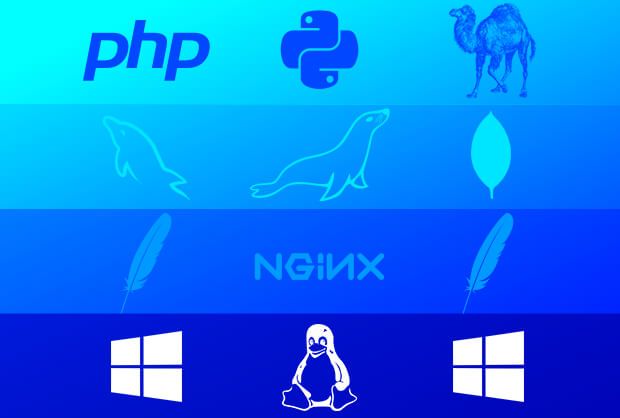
The operating system – usually Windows or Linux based – provides the main interface between the server hardware and the other parts of the software stack.
The web server – often Apache or NGINX – stacks on top of the OS to serve client requests (e.g. from web browsers) with the appropriate content. This content can be static, like HTML files and images that appear the same way for every user, or dynamic, such as interactive forms and anything that reacts to user input. While static content can be served directly by the web server, dynamic content is only possible with the help of databases and scripting.
The database – which might be MySQL or MariaDB, just to name a couple of options – stores the data that the web server needs to access in order to serve dynamic content to clients. The database also needs to work in tight coordination with a scripting language to deliver advanced functionality.
And scripting languages like PHP, Python, Perl and JavaScript run either on the server or client-side. This code allows complex processes to be automated and executed on the fly, enabling dynamic content to be generated based on a huge range of variables.
Working together, these services form a platform for a wide variety of websites and applications. Depending on the needs of the project, different stack configurations can fulfil very different needs. For example, while the LAMP stack is great for PHP-based applications such as WordPress, more JavaScript-focused projects will need a stack that includes specialised frameworks.
LAMP-based stack
The humble LAMP stack is popular for a reason. It combines several powerful open-source software packages – a Linux OS, the Apache web server, the MySQL database and the PHP scripting language – with each component complementing the others to provide a full range of web development functionality.
But the LAMP stack isn’t the only option. In fact, it’s just the beginning. With a whole host of variations on the LAMP stack, it’s possible to find a web service stack that meets the exact needs of virtually any project.
Whether it’s substituting Apache for NGINX with LEMP, or choosing Windows instead of Linux with WAMP, the LAMP stack model provides the ideal foundation for many web applications. Then there are other takes on the web stack concept, such as the MEAN stack and its variants. But with so much choice when it comes to web software bundles, the right solution isn’t always obvious.
Full stack developers have alternatives to LAMP
Full stack developers love LAMP for its open-source accessibility, community support and customisation. As such, the LAMP stack provides the basis for a number of variations. Twists on the LAMP formula include:
- LEMP – which swaps out Apache for NGINX (the E comes from the pronunciation of “engine-X”, since LNMP doesn’t exactly roll off the tongue)
- LLMP – replacing Apache with lighttpd
- LAPP – switching MySQL for PostgreSQL
With so many Linux distributions out there, it’s no surprise that these LAMP variants all begin with L. If you’re a Linux developer, you’re likely to find a LAMP-like stack that supports your tools of choice, whether it’s a specific web server or a particular database. And for other operating systems, there are yet more options.
Not a fan of Linux? Alternative stack options exist
In addition to distros like Debian and Ubuntu, the LAMP stack model can support non-Linux operating systems. WAMP, for example, uses the same components of the standard LAMP stack, but on top of a Windows OS.
As discussed in a previous article, XAMPP is a cross-OS stack (hence the X) which works equally as well on Linux and Windows with PHP or Perl (the double-P). Ideal for creating test servers, XAMPP can be downloaded as a single file and easily installed. It’s a great option for testing applications that need to run across different operating systems.
For more advanced Microsoft-centric applications, the LAMP stack isn’t going to cut it. This is where a specialised stack like WISA comes in. WISA is basically ‘“the Microsoft stack’”, containing the following components:
- Windows Server – the OS
- Internet Information Services (IIS) – the web server
- Microsoft SQL Server – the database
- ASP.NET – a web application framework
For many developers, LAMP vs WISA essentially comes down to PHP vs ASP.NET languages. The scripting you need to use will likely make up your mind for you. And of course, the proprietary nature of Microsoft products means that cost could be an issue.
The MAMP stack is a way of running the classic LAMP stack components on macOS. MAMP is downloaded as a complete package that includes Apache, NGINX, MySQL, PHP, Python and Perl, all with instant macOS compatibility. This is as opposed to individual software versions, which need to be installed manually and aren’t always up to snuff in terms of macOS integration.
One major draw of MAMP is its ability to run WordPress locally on a Mac. With MAMP, Mac users can work directly with WordPress files without uploading and downloading them via a web server – ideal for WordPress development and testing purposes.
Software stacks for MEAN developers
A MEAN stack is another option to the traditional LAMP stack setup. A MEAN stack comprises:
- MongoDB – a NoSQL database
- Express – a web application framework for Node.js
- AngularJS – a JavaScript-based web application framework
- Node.js – a runtime environment
Obviously, this is not the classic LAMP stack structure. The MEAN model isn’t dependent on a particular OS, and Express can provide the functionality of a web server. This means that MEAN is a slimmed-down option compared to LAMP, and because a single language – JavaScript – runs at every level of the stack, MEAN has the potential advantage of not having to switch between languages.
Some variations on a MEAN software stack include:
- MERN – using React instead of AngularJS
- MEEN – replacing AngularJS with Ember.js
In a LAMP vs MEAN comparison, the deciding factor could well be the database: MySQL vs MongoDB – or in other words, SQL vs NoSQL. While SQL (relational) databases like MySQL and MariaDB are well-liked for their ability to efficiently manage large data volumes in complex structures, NoSQL databases like MongoDB are often preferred for their increased flexibility in smaller applications.
Ultimately, your choice of web stack will probably boil down to a particular tool or set of tools that you need to use. Frequently this is a particular scripting language like PHP or JavaScript, but equally it could be a specific web server, database or framework. With so many possible configurations, the final decision rests on the details of your project and your skill set as a developer.
At Fasthosts, our next-gen Cloud Hosting offers managed software stacks with a selection of the latest Linux operating systems. With cloud hosting, you get a complete package of software and tools, plus the performance of dedicated resources. Talk to our sales team to get started.